 Muster Drill
Security
Security
In short
Muster Drill’s checker runs in Muster Drill’s own AWS account, and its code stays private. What it may do in your account is fixed by the connector, a CloudFormation template you read and deploy yourself. The connector creates narrowly scoped roles that trust one Muster Drill role, need your account’s ExternalId, and sit under a boundary that keeps them to your regions. Your data stays in your account: only resource settings, restore events and check results leave, never a login, table name, query result or disk contents. You can cut Muster Drill off at any time by deleting the stack.
- The trust model
- The roles we may assume
- The boundary, and what IAM cannot narrow
- The ExternalId
- What leaves your account
- Where results live, encryption and retention
- Cutting Muster Drill off
- Seeing every session in CloudTrail
- Code that runs in your account
- If Muster Drill were compromised
- Verified by test
- Not done yet
The trust model
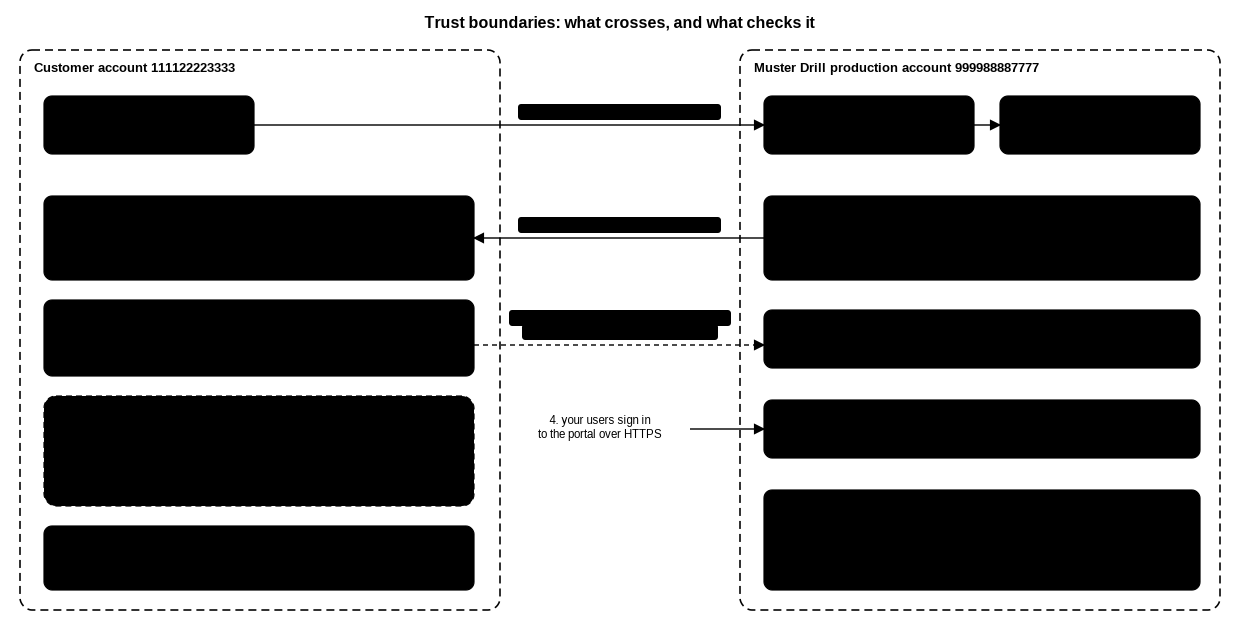
Four things cross the boundary between your account and Muster Drill’s. Nothing else does.
- Events, from you to us. Only events that match the connector’s rules: AWS Backup restore job events, and, if you name your vendor’s restore role, that role’s create calls from CloudTrail. EventBridge sends them with the connector’s forwarder role, which may put events on Muster Drill’s bus and nowhere else. EC2 state changes and volume events stay in your account.
- Role assumption, from us to you. Muster Drill’s checker calls
sts:AssumeRoleon a connector role. The trust policy names one role, never Muster Drill’s whole account, and needs your account’s ExternalId and a session name that starts withmuster-drill-. Sessions last at most an hour. - Answers, from you to us. What the roles’ calls return: settings and states, the server script’s output, and the probe’s and the EBS reader’s statuses and totals. Listed below.
- People. Your users sign in to the portal over HTTPS. They never get AWS credentials from Muster Drill.
Every role Muster Drill assumes has exactly this trust policy, with your ExternalId in place of the example:
{
  "Effect": "Allow",
  "Principal": { "AWS": "arn:aws:iam::999988887777:role/muster-drill/MusterDrillChecker" },
  "Action": "sts:AssumeRole",
  "Condition": {
    "StringEquals": { "sts:ExternalId": "md-EXAMPLE-0123456789abcdefghijklmnopqrstuvwxy" },
    "StringLike": { "sts:RoleSessionName": "muster-drill-*" }
  }
}
999988887777 stands for Muster Drill’s account here. The published template carries the real one, and IAM refuses the stack if that role does not exist.
The roles we may assume
Every one lives at the path /muster-drill/, carries the permissions boundary MusterDrill-Boundary, and works only in the regions you list in AllowedRegions.
| Role | On | Can | Cannot |
|---|---|---|---|
MusterDrill-Read | Always | Describe EC2 instances, their status, volumes, snapshots and security groups; RDS instances and Aurora clusters; AWS Backup recovery points. List resources by tag. Read console output only if you set ReadConsoleOutput | Read any data: no S3, no Secrets Manager, no database, no disk. Change, start, stop or delete anything |
MusterDrill-Validate | On by default (EnableValidate) | backup:PutRestoreValidationResult: mark a restore test’s copy SUCCESSFUL or FAILED with a message | Start, stop or delete a restore or a recovery point. Anything else |
MusterDrill-Ec2Script | Opt-in (EnableEc2Script) | Run the connector’s own SSM documents, MusterDrill-Layer1Linux and MusterDrill-Layer1Windows, and read their output | Run any other document, including AWS-RunShellScript. Pass commands: the documents take no parameters. Start a session or change an instance |
MusterDrill-RdsProbe | Opt-in (EnableRdsProbe) | Invoke one published version of the probe, pinned by its SHA-256 | Read your login secret. Connect to a database itself. Invoke any other function or version |
MusterDrill-EbsReader | Opt-in (EnableEbsReader) | Invoke one published version of the EBS reader, pinned by its SHA-256 | Read a block, create or delete a snapshot, or use a KMS key itself. Invoke any other function or version |
The connector also creates roles and policies Muster Drill cannot assume: the probe’s own role (it may read the one login secret and the one rules file you name; so that Lambda can run it in your VPC, it may also create network interfaces only in the subnets you name with its own security group, delete and assign addresses to network interfaces in the stack’s region (Lambda refuses a narrower scope for those), and write its own logs; only the probe’s code runs with this role), the EBS reader’s own role (it may read snapshot blocks, and snapshot a volume and delete only snapshots tagged muster-drill-reader=true), MusterDrill-KmsUse (decrypt with the keys you list, only through EBS or Secrets Manager, attached only to those two functions’ roles), and the forwarder role (put events on Muster Drill’s bus only). No role in the stack can use IAM, STS, Organizations or CloudFormation, or start, stop or restore a resource. Only two can delete anything: the EBS reader, only its own snapshots, and the probe’s own role, network interfaces in the stack’s region. Until connector 1.0.1 the probe’s role had AWS’s managed policy AWSLambdaVPCAccessExecutionRole, which allows those network interface actions on any resource and in any region. A test pins every action, resource, condition and trust policy in the template.
The boundary, and what IAM cannot narrow
MusterDrill-Boundary is a permissions boundary on every role Muster Drill assumes. It caps actions and regions: even if someone in your account later attaches a broad policy to one of these roles, the role can use only the actions in the table above, taken across all the roles, and only inside AllowedRegions. It cannot narrow resources: a broad policy on one of these roles could reach every action in the boundary on any resource, including ssm:SendCommand with any document and lambda:InvokeFunction on any function. Don’t attach other policies to them. In a test, with AdministratorAccess attached to MusterDrill-Read, S3, IAM, Secrets Manager and volume creation were still refused, and so were calls in a region you had not allowed; an action in the boundary but not in that role’s own policy (ssm:DescribeInstanceInformation) was allowed.
Three permissions cannot be narrowed further in IAM. Muster Drill’s code is what limits them, and the connector gives you a switch where it can:
- The server script’s target. IAM cannot limit
ssm:SendCommandto restored copies, so the role could run the connector’s read-only script on any instance in your allowed regions. The checker sends it only to copies found through AWS Backup or your vendor’s restore role. WithRequireCheckTagon, IAM also refuses any instance without the tagmuster-drill:check. - The EBS reader’s snapshots. IAM cannot limit snapshot creation to restored volumes, so the reader could snapshot any volume in your allowed regions. What it reads never leaves your account: it answers counts only.
RequireCheckTaglimits it to tagged volumes too. - Restore test results.
PutRestoreValidationResultsupports no resource or condition, so the role could write a result on any restore job in your allowed regions. A wrong result changes only what AWS Backup reports; it neither deletes nor keeps a copy.
The ExternalId
- One per AWS account. When you add an account in the portal, Muster Drill generates its ExternalId:
md-and 43 random characters (256 bits). You never pick it, so it cannot collide with another customer’s, and a leaked value exposes one account only. - Shown once. The portal shows it, with the connector’s launch link, once. Afterwards it shows only a masked form.
- Encrypted. It is stored encrypted under a KMS key whose policy lets only Muster Drill’s checker role decrypt. The portal can encrypt with that key to issue a value, never decrypt. Administrators of Muster Drill’s account cannot decrypt either, but they can change the key’s policy. It is never logged.
- Not a password. It is useless without Muster Drill’s checker role, which is the only principal the trust policy accepts. It is still kept confidential.
- Rotation. Choose “New ExternalId” in the portal and update your stack with it. Muster Drill switches once an AssumeRole with the new value succeeds; until you update, the old value keeps working.
What leaves your account
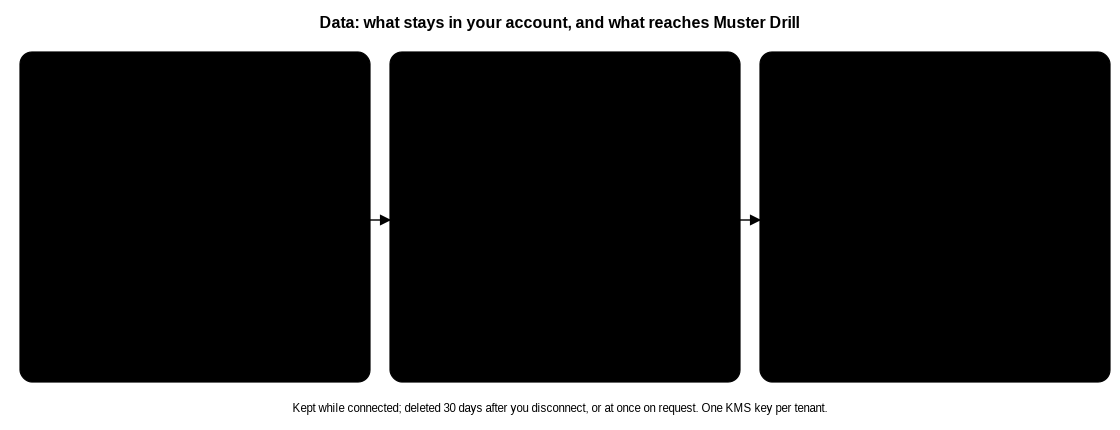
Never leaves
- The database login. The probe reads your secret itself, in your account; Muster Drill’s roles cannot read it.
- Table names, per-table counts and ages, your rules file and its SQL, and any query result other than totals.
- Disk contents. On a server only the fixed script’s output leaves; on a volume the EBS reader reads a few sampled blocks in memory and answers counts.
- AWS credentials. Muster Drill’s sessions are created by AWS STS for its own role and never handed to anyone.
Events the connector forwards
| Event | What reaches Muster Drill |
|---|---|
| AWS Backup restore job state change (completed or failed, restore testing included) | The whole event: restore job ID, status, resource type, the restored and source resource ARNs, recovery point and vault ARNs, the restore role, times, size, the restore testing plan when there is one, and your account and region. For a failed job, AWS’s status message. |
| Your vendor’s create calls (only if you name the vendor’s restore role) | The whole CloudTrail record: the call’s name and time, the vendor role’s ARN, session name and access key ID, source IP address, user agent, request parameters (such as instance type, subnet, security groups, snapshot ID and tags) and the new resource’s IDs. EventBridge cannot trim an event sent to another account’s bus, so it arrives whole. |
Muster Drill queues each event whole until it is checked: it waits in the task queue for up to 4 days, or up to 14 in the dead-letter queue if checking it fails. Only the fields the checks need are stored. Trimming events before they are queued is planned.
Answers to the roles’ calls
| Call | Returns | Kept |
|---|---|---|
Describe calls (MusterDrill-Read) | Settings and states: type, image, network, addresses, security groups and their rules, encryption key, tags, the database’s engine and endpoint | Checks and their short details, such as “public address” or a security group ID. The database’s master user name is not kept |
| Recovery point | Creation time, vault, key | Which backup was restored, and its age |
Console output (only with ReadConsoleOutput) | The boot log | Only the names of boot-error markers found |
| Server script | Missing mount points, failed service names, two timestamps, and on Windows a count of boot errors | Checks and numbers; the raw text is dropped |
| EBS reader | Check names, statuses, fixed reasons and counts (blocks written, sampled, changed, matching the source) | All of it. No block data, filesystem name, snapshot or volume ID is in it |
| RDS probe | Check names, statuses, fixed reasons and totals (tables, expected tables missing, total rows, the newest data’s age, rules failed) | All of it. No table, column or rule name is in it |
The probe takes a request that names a restored copy’s endpoint and nothing else. It refuses any other field, so no login, SQL or table name can come in, and it refuses a host that is not an RDS or Aurora endpoint in its region. It runs only its fixed queries and the rules in your own rules file. A yes-or-no question can leak data one bit at a time, which is why Muster Drill cannot send it a query of its choosing.
Where results live, encryption and retention
| Item | How |
|---|---|
| Region | Everything Muster Drill keeps is in AWS’s ap-south-1 region (Mumbai), in Muster Drill’s production account, which is separate from the account that publishes the connector. |
| Results | One S3 bucket, with your organisation’s records, drill baselines and reports under a prefix of its own. Versioning on, public access blocked. |
| Encryption | Each organisation has its own customer-managed KMS key. The bucket refuses connections without TLS and any write that does not name a KMS key. The storage role’s session can use only your organisation’s key, through a permission that matches the key’s organisation tag. |
| Isolation | The checker works for one organisation at a time, and reaches storage through a role whose session is tagged with that organisation: it can touch only that prefix and that key. A bug that mixed two organisations would get “access denied”, not the other’s data. |
| Registry | An encrypted DynamoDB table with your organisation’s ID, and per AWS account: the account ID, regions, the ExternalId’s ciphertext, the role ARNs from the connector, its version and the connection status. |
| Sign-in | Your users’ email addresses and passwords are held by Amazon Cognito, not in the registry. Multi-factor sign-in with an authenticator app is available. |
| Logs | Kept 30 days. Muster Drill’s own log lines hold IDs, counts, outcomes and session names; never an ExternalId, event body or AWS error message. If a function fails unexpectedly, Lambda logs the error’s message and stack trace, which can include an AWS error message. |
| Retention | Kept while you are connected. If Muster Drill’s role is refused for 24 hours, the account is marked disconnected and checking stops. Your records, reports and baselines are deleted 30 days after your last account is disconnected. |
| Queues and backups | Events and tasks wait in the task queue for up to 4 days, or 14 in the dead-letter queue if checking fails. The registry keeps point-in-time recovery for 35 days, so earlier versions of its rows can be restored for that long. Delete my data does not clear either. |
| Delete my data | In the portal, at any time: every stored object is deleted at once, your organisation’s key is scheduled for deletion (AWS waits 30 days before it is gone), your accounts leave the event bus, and your sign-in is deleted. A record that the organisation existed is kept: its ID and name, the AWS account IDs and regions you connected, your vendor’s role ARNs, the forwarder role ARN, the connector version and dates. It holds no ExternalId and none of the roles Muster Drill assumed. |
Reports are not copied into your own bucket in this version: download them from the portal as HTML or JSON.
Cutting Muster Drill off
| You do | Effect | Tested |
|---|---|---|
| Delete the connector stack | Roles, rules, scripts and functions are gone. New sessions are refused, and sessions already issued stop working once their role is deleted. | AssumeRole refused 18 seconds after deletion began; an open session failed too |
Change ExternalId in the stack | Same cut-off for new sessions, keeping the stack. A session already issued runs until it expires, at most an hour. | New sessions refused after the update, which took about a minute |
Turn off one option, such as EnableEc2Script | Removes that option’s role and what it created: the SSM documents, or the function with its own role, security group and log group. The checks that need it are reported as skipped, with the reason. | From the template |
| Disconnect, or Delete my data, in the portal | Muster Drill stops checking and removes the account from its event bus; your data goes as described above. | Both in the service’s smoke tests |
With the RDS probe, first remove the rule that lets the probe’s security group into your restore group, or the stack’s deletion fails; deleting it can take up to 20 minutes while Lambda releases the probe’s network interfaces. Snapshots the EBS reader had not yet deleted stay in your account, tagged muster-drill-reader=true.
Seeing every session in CloudTrail
Every session Muster Drill starts in your account is named muster-drill-<tenant>-<purpose>-<run>: your organisation’s ID from the portal, what it is for (such as event, sweep, manual, ec2, probe or validate), and the check it belongs to. In your CloudTrail, the calls appear as an assumed role, for example:
arn:aws:sts::111122223333:assumed-role/MusterDrill-Read/muster-drill-t0a1b2c3d4e-sweep-5f6a7b8c9d0eEach server script run names the connector’s document and the instance.
Code that runs in your account
The checker’s code is private and runs in Muster Drill’s account. A new checker release reaches every customer at once, but it can only do what your connector allows, and the connector changes only when you update it, from a change set you can read. Muster Drill never updates it for you.
Only two small functions, both optional, run Muster Drill code in your account: the RDS probe and the EBS reader. Both are Python source, not compiled code, published with each connector version. The template pins each one’s SHA-256, so the stack fails if a download does not match, and Muster Drill’s roles may invoke only that pinned version. The server scripts are written out in full inside the template. Each connector version is published once and never overwritten, with its checksums and a changelog.
If Muster Drill were compromised
Someone who took over Muster Drill’s account could assume every connected customer’s roles. The connector still limits what that gets them: describe answers, writing false restore test results, running the one read-only script, and invoking the probe and the EBS reader, which answer totals and counts and run no query of the attacker’s choosing. No data leaves through a role, except your instances’ boot console output if you turned on ReadConsoleOutput. The reader could still be made to snapshot and sample volumes in your allowed regions, and report counts. A customer cannot use Muster Drill to reach another customer’s account: role ARNs and ExternalIds are looked up by organisation, never taken from an event or a request, and your roles accept only the ExternalId issued for your account.
Verified by test
Run in my own test accounts on 25 November 2026, against the connector’s template and the hosted service:
- Trust: no ExternalId, a wrong one, a session named
checker-…orMuster-Drill-…(the match is case-sensitive), a two-hour session, Muster Drill’s own administrator and the customer’s own administrator were all refused. - Roles and boundary:
MusterDrill-Readwas refused S3, Secrets Manager and SSM, and calls outsideAllowedRegions; with AdministratorAccess attached it stayed inside its boundary and regions. - Server script: the role ran the connector’s Linux document on a test instance and read its output.
AWS-RunShellScriptby name or ARN, and the document with commands added, were refused. WithRequireCheckTag, an untagged instance was refused and allowed once tagged. - Pinned code: a probe zip that did not match its hash rolled the stack back; the unpinned function and
$LATESTwere refused. - The probe: in a private network with no NAT, it read its own login secret through a Secrets Manager endpoint and the rules file through an S3 endpoint, checked a restored PostgreSQL copy, and answered with no table name, password or row data. Through the hosted service, restored PostgreSQL, MySQL and MariaDB copies then passed layers 0 to 3 the same way, with neither password in Muster Drill’s logs.
- The EBS reader: a restored volume with known blocks went through the hosted service end to end. The result held counts only, and the content marker was found 0 times in anything stored or logged on Muster Drill’s side. No reader snapshot was left behind.
- Events: 20 of 20 test events reached Muster Drill’s bus in about 1.2 seconds, from the same region and from us-east-1; an event sent before an account was connected was dropped, not delivered later.
- Restore testing: the checker’s session on
MusterDrill-Validatewrote SUCCESSFUL on a real restore test, shown by AWS Backup. - Revocation: as in the table above.
- Portal: 28 of 28 checks passed, with a second organisation’s user calling every route against the first’s account, and both deleting their data afterwards.
- Logs: no ExternalId in any function’s log.
The template is linted on every change, and IAM Access Analyzer’s policy validation finds nothing in its policies.
Not done yet
These are planned, not in place, and the site will say so until they are.
- Controls on Muster Drill’s own production account: a CloudTrail trail, GuardDuty, service control policies, multi-factor access only, and no humans in production. Today, code changes go through pull requests and CI; deploys are made by hand with the owner’s approval.
- Signed checker code and staged releases, with Muster Drill’s own test accounts first.
- The Windows server script through the connector: it is in the template, and was tested with the checker inside an account, but has not yet run through a deployed connector.
- Other regions for the probe and the EBS reader: in connector 1.0.1 their code is published in ap-south-1 only, so they run only in a stack there.
Before you connect, I walk your security team through the template, every role and the scripts. Ask for that review.